Abstract:
Mobile data collection and reporting projects are abundant now that mobile use for development is taking off. Unlike bulk messaging and general information services that are targeting the general public as recipients of standardized messaging, mobile data collection tools are often used internally in an organization, customized to fit with existing organizational processes.
This may mean using services or applications that are not part of most people's day-to-day experience of mobile use. Add a liberal sprinkling of jargon (and the mobile world's plague of acronyms) and you have a recipe for much technical confusion!
This article looks at choosing a mobile data collection solution, from defining the information requirements to choosing the most appropriate technology strategy for a specific organizational context and communication environment.
We also review a selection of commercial and non-commercial tools.
This may mean using services or applications that are not part of most people's day-to-day experience of mobile use. Add a liberal sprinkling of jargon (and the mobile world's plague of acronyms) and you have a recipe for much technical confusion!
This article looks at choosing a mobile data collection solution, from defining the information requirements to choosing the most appropriate technology strategy for a specific organizational context and communication environment.
We also review a selection of commercial and non-commercial tools.
Introduction
Mobile data collection and reporting projects are abundant now that mobile use for development is taking off.Unlike bulk messaging and general information services that are targeting the general public as recipients of standardized messaging, mobile data collection tools are often used internally in an organization, customized to fit with existing organizational processes.
This may mean using services or applications that are not part of most people's day-to-day experience of mobile use. Add a liberal sprinkling of jargon (and the mobile world's plague of acronyms) and you have a recipe for much technical confusion!
This article looks at choosing a mobile data collection solution, from defining the information requirements to choosing the most appropriate technology strategy for a specific organizational context and communication environment.
We also review a selection of commercial and non-commercial tools.
Getting the process right: Designing/refining
Whether conducting a once-off study or developing a mobile solution for routine and ongoing data collection and reporting, collecting the right information from the start is critically important. A mobile solution can either replace an existing paper-based process or constitute an entirely new business process -- which means starting from scratch with a system design process.Either way, it's important to involve all stakeholders, including those who will collect the data, those who will use or analyse it, and those who will manage the process. Some points to consider:
What data is to be collected?
Does the current system (if any) meet requirements? Is redundant data being collected, or is there something important missing? If data was to be available for analysis in a much shorter time-frame with the new mobile-based system, would it be useful to collect something that is not currently useful? Whether designing or redesigning data collection requirements, it may be helpful to create a paper form that represents the new data set. This can be a shared artifact agreed on by all stakeholders, as well as feeding into the system development process.How will the system fit best with the work flow of data capturers?
Is it possible for data input to be done directly on the phone, or will it still be captured on paper first? For example, if a nurse is expected to capture the data while talking to a patient, would it be considered distracting and/or inappropriate for a phone to be used? Or, if fieldworkers are expected to work in potentially unsafe areas, would conspicuous phone use make them vulnerable to crime or surveillance in any way? In other words, be very clear about by whom and how the data will be collected and transmitted.How will the data be analyzed?
It is important to consider the data requirements of external systems that will be used in analysis. If everyone at the central coordinating office uses Microsoft Excel, consider a solution that allows data to be exported to Excel unless you can convince everyone to switch. If data is to be analyzed and responded to in real-time, consider setting up an auto-response system, or having the system staffed at appropriate times by a human responder. How feasible this is really depends on the volume of data coming in, but it's an important point to get right. If the person sending in data is expecting a response and doesn't receive one, they will very quickly give up on the system.How will the data collection process be managed?
Regardless of the technology used, successful data collection requires management. Responsibility for tasks such as initial training, provision of phones and airtime, ongoing management of data capturers and resolution of system problems should be decided upfront. This includes the financial responsibility for the system in the long term, something which many pilot studies fail to consider. To this end, it is important to know what the running costs of the system are likely to be in the long term, including replacement phones and monthly airtime bills. It may well be that costs exceeds the cost of an existing paper-based system, so all returns on investment (time savings and speed of transmission, increased accuracy of data, etc) need to be taken into consideration to justify the costs of a mobile data collection system.Technologies
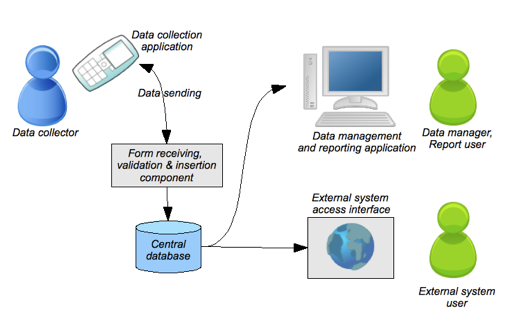
Mobile data collection systems typically have several components that communicate for data collection, transmission, storage and retrieval.For each component and communication channel, there may be several technology options, appropriate for different situations. While many data collection systems are built from existing commercial or open source components, or even come packaged as an end-to-end solution, it's important to understand the options and limitations imposed by the technical system design. In this section, we look at the following components:
- The data collection client interface, which the user interacts with to accomplish data collection and transmission
- The data transfer method, which dictates how the information input on the phone is transmitted to a central server for storage and retrieval.
- Server-side components to receive and store the data, and allow users to display and manage the database.

Data collection client
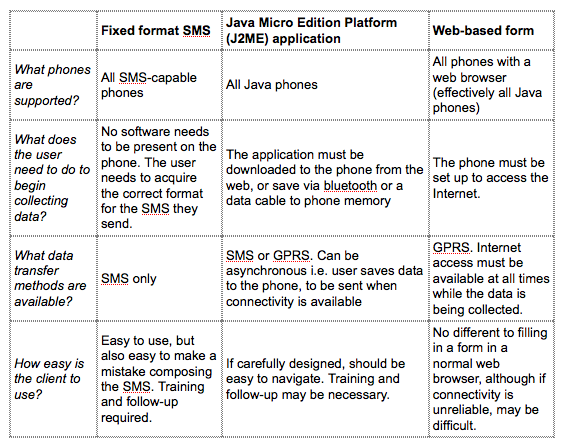
By now, you should have a good understanding of the people who'll be collecting data, and the environment in which they will work. You can now begin to design the data collection client application, which the data collectors will use to input data and submit it to the central system. In the table below, three of the most common types of data collection client application are compared. These are:- Fixed format SMS. The 'client application' in this case is the phone's built-in SMS functionality. The user writes and SMS in a predefined format, representing answers to successive questions. For example, and SMS for the trip logging application, in the format (trip date,destination,reason for trip,start mileage reading,end mileage reading) might be input as '16/11/08,Entebbe, meeting,1250,3000'. RapidSMS is one system that uses this method.
- Java Micro Edition Platform (J2ME) application. A J2ME application is written in the Java programming language, and loaded onto the phone over bluetooth or by downloading the application from the Internet. To use the client application, the data collector navigates through questions in an application on the phone, which collects the answers and submits the completed form to a server. The questions can be hard-coded into the application, or read from forms downloaded to the phone. Mobile Researcher, Episurveyor and JavaRosa have client applications written in J2ME, as does the FrontlineSMS forms client.
- Web-based forms. The 'client application' for web-based forms is the phone's web browser. The user browses to a website, where the form is published in an optimized format for mobile browsers. The form is then filled out online, and saved directly from the web page. Mobile researcher offers this option.

There are many variations within theses three categories, as well as some less popular technologies for data collection client applications that may still be appropriate. Three interesting alternatives are voice-based data collection, Wireless Internet Gateway (WIG) menus and USSD.
- In voice-based data collection, the user dials a number and then chooses from options on a menu (“to record the answer to this question, press 1 for yes, 2 for no, 0 if you are unsure” etc). This is useful when there are low levels of literacy among data collectors, or when a system is needed that caters for both landline and mobile phones. Voxiva's system, described in more detail in the tools section, is an example.
- WIG (Wireless Internet Gateway) use a programming language (Wireless Markup Language, or WML) that is internal to almost all SIM cards. This means a Java phone is not required to use a WIG menu, although the fact that SMS is the only available data transfer service may negate any cost savings from this over time. The menu definition is easy to write, but the size limit is 1MB, making it difficult to support long menus or multiple languages. The other serious limitation of WIG menus is that they need to be sent to the phone (“pushed”) by the operator. As a result, WIG menus are only really feasible for organisations able to work closely with a cellular operator, and then only for relatively small-scale systems.
- USSD (Unstructured Supplementary Service Data) will be familiar to many people as the service you use to check airtime balance (for example, by dialing *111 and following the text prompts), or to request settings from the network operator. USSD is a real-time question-response service, where the user initiates a session and is then able to interact with the remote server by selecting numeric menu options. The main limitations of USSD for data collection are the requirement that the phone be continuously connected during the session (which means that it needs a good, consistent signal), and the limited length of USSD menus. Despite these, USSD is attractive as sending an USSD costs a fraction of that of an SMS. USSD services need the close cooperation of the carrier. We are currently aware only of banking services such as Wizzit in South Africa, for example, of using USSD for data transfer. If there are commercial or NGO services using USSD for data collection, we'd love to hear about it.
Data transfer method
Once data has been captured on the phone, the completed form generally needs to be submitted to a central back-end server. Data collection with PDAs typically requires synching with the server when the device is connected via bluetooth or a data cable, which requires that the data collection device be returned periodically to a central location.(An exception is AED/Satellife's African Access Points, battery-operated units that contain a GSM cellular transceiver and a data cache; each access point can support up to 1,000 handheld units. The access point communicates with a server by making cellular phone calls, and with the handheld units via their infrared beam. When users "beam" to the access point, information is uploaded and downloaded.)
Mobile phone data collection systems usually leverage the GSM network for remote data collection, transmitting completed forms via SMS or GPRS.
There are some key differences between SMS and GPRS. First, SMS is available on almost all phones, while GPRS is a higher-end (although increasingly prevalent) technology. If you are unable to ensure that data capturers can use GPRS on their phones (for example, when you are relying on people using their personal phones), you may wish to choose SMS, or at least offer SMS as an additional option for form submission.
The major reasons for favouring GPRS are cost and data size. With SMS, you are limited to 160 characters of data (more if you use multiple messages for one form, and slightly more if you have a compression step prior to sending), whereas with GPRS there is no realistic limit to the size of the form you submit. Also, for the cost of one 160-character SMS, it is possible in most countries to send many times that amount of data via GPRS (in South Africa, R2.00 buys 1Mb of GPRS data, equivalent to 7200 SMS messages. One SMS message costs around 80c).
A final consideration, discussed in more detail in the next section, is what kind of system needs to be in place to receive the form sent. If using SMS, the form needs to be sent to a number recognized on the GSM network. This can be a normal phone number. If the data volumes are low, it is feasible to receive forms using a phone or GSM modem connected to a PC. FrontlineSMS in its basic form operates that way.
However, most systems with any realistic load will need to employ the services of a commercial SMS gateway provider, who will receive the incoming SMS and then submit them to your server over the Internet. This comes at a price, which needs to be factored in when choosing a data collection method. Conversely, with GPRS, the form can be submitted directly to your server over the Internet. This means you don't need additional hardware or third-party service providers.
Server-side components
Although your choice of data collection and data transfer method will partially determine what server-side components you require, you also have some scope for customization, particularly of the data reporting and management interface that will be presented to data users and/or external systems. Broadly, three components should be considered:- A component that receives the submitted forms, checks for errors and then either rejects the form (with appropriate error message to the data collector) or initiates insertion of the data recorded into the database.
- A database system.
- A reporting interface, or several if you intend to cater for different types of users, or for access by both human users and external software systems.
For SMS, you can receive the message yourself using a phone or GSM modem, both of which will have a SIM card inside with a predefined phone number to which the message must be sent. Alternatively, you can contract a bulk SMS provider to receive the message for you and pass it to your server, in which case the message will be sent to a short code (e.g. 30080) owned and managed by the SMS provider. The first option is feasible for small systems and pilots, where uptime is not completely critical. However, even with a GSM modem you are only able to receive a few messages per minute. Using an SMS provider frees you from the responsibility of ensuring that the system is always available, and also introduces the possibility of cost saving and reverse-billed SMS, which is free for the sender. Once the SMS data has been received, it must still be verified and inserted in the same manner as GPRS submission, although because you are already set up to handle SMS, it may be easier to notify the user in case of a failed submission.
The choice of database management and reporting components is beyond the scope of this overview, and the choices are vast. Probably the most important factor to consider is whether you are able to use an existing off-the-shelf survey management system (for a nicely configurable open source example, check out [Lime Survey], for example), or whether you need a developer to customize a system for you, or even to build something from scratch. The latter is likely to be significantly more expensive, although there are open source components that can be used as is or customized to form part of the system. Two very popular database systems, MySQL and PostgreSQL, are open source, and may be a good choice for organizations with budget constraints who nevertheless want to build their own system.
Similarly, open source web application frameworks like [Ruby on Rails] or [CakePHP], both of which are designed for rapid development, can help to reduce cost and development time. In all cases, it's important that you have a clear understanding of your needs, as well as resources available, before you start. If you are getting developers to build a system, you should also require that the process be clearly documented, with high-quality specifications and regular feedback, and make yourself available to the development team for this purpose.
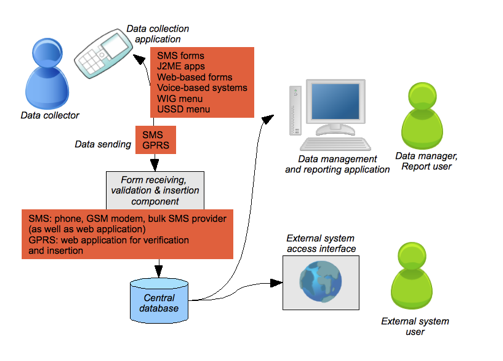
The graphic below consolidates all the technology components described in this article.

Tools
This section takes a look at some tools and components for mobile data collection. Some are full end-to-end systems, offering everything from the client application to the data management interface. Others are client application components only, and one (Kannel) is a dedicated SMS receiving component. What you choose depends on the specific needs of your situation, as well as the resources available and whether you have (or can buy in) the skills to do system customization or development.JavaRosa
[JavaRosa] is an open-source J2ME implementation of the [OpenRosa] standard for data collection on mobile devices. OpenRosa, in turn, is based on the [W3C Xforms] standard for the definition of data collection forms. What this means in practice is that the form design is completely separated from the application – you design the form you want data collectors to fill in and write it using the xforms syntax, and then the form can be loaded into JavaRosa (or, in future, implementations of the OpenRosa standard for other mobile platforms, such as Google's Android platform). JavaRosa handles everything on the client side (asking the user questions, saving the form, allowing the user to review and edit saved forms) as well as form submission over GPRS.JavaRosa is still under development; although a relatively stable version is already available to developers. In the next few months, the group plans to add SMS functionality as well as support for more advanced form features such as question grouping and repeated questions. There are also plans to release an end-to-end system, probably in late 2009.
Good for: There is more detail about the phone specs required for JavaRosa in the table at the end of this section (at this stage, they're a bit higher than some of the other applications), but it's an exciting option for organizations who plan to build a data collection system with the help of an in-house or contracted development team. Recommended if you want standards compliance, solid architecture and an active and supportive development community.
RapidSMS
RapidSMS is a system for managing SMS and audio messaging campaigns, developed by UNICEF. MobileActive has previously published a full review of the system, but what's interesting from a data collection point of view is the SMS forms functionality. RapidSMS offers a straightforward implementation of the SMS forms concept, with no special software on the user's phone. Once the server-side setup is complete (currently a bit tricky, requiring some specialist Linux knowledge and a large number of software dependencies), activating the SMS form functionality is a matter of designing a form in the web interface, and then waiting for your data to come in.Once you're up and running and data is coming in, RapidSMS also offers some basic analysis tolls. You can view and graph the data, or export it as an Excel spreadsheet. Also, the system is web-based, so if you have a distributed team that needs to access the data, all they need in an Internet connection.
One of the problems with any SMS form system is that quite a few of the messages that come in will be incorrectly formatted for automatic processing. RapidSMS has a message correction screen in the web interface where you can manully correct these. However, bear in mind that forms longer than a couple of questions will always have a high proportion of user errors.
Good for: RapidSMS is great as a quick solution for basic data collection (and in fact was designed for use in disasters and emergencies). You can use it with the most basic phones and, once you've negotiated the complicated setup process, it's an out-of-the-box end-to-end solution. Over time, you might want to consider replacing it with something more robust if your data collection needs get more complicated, or the mounting cost of SMS is becoming a concern.
FrontlineSMS
FrontlineSMS is a well-known bulk SMS application designed for the NGO sector. In a recent review of the application, we mentioned that the next release of the system will include form-based data collection functionality. This release has not yet happened, but once it does in early 2009, there is likely to be lots of interest in this new feature, especially from existing FrontlineSMS users who already have the system set up to send and receive SMS, and who are comfortable with the user interface. (See below for an update on the Forms client which was released in early March 2009)It's hard to review a tool that hasn't yet been released, but from what we've been told the FrontlineSMS forms client will be a complete end-to-end system, with basic server side analysis and export functionality similar to that of RapidSMS. The difference is that, rather than sending in an SMS in a predefined format, data collectors will use a J2ME client application designed using FrontlineSMS's form designer. This should help reduce error rates. Collected data is transmitted via SMS (with associated costs). The FrontlineSMS forms client will compress and combine as many completed forms as possible into single messages and thus potentially reduce SMS costs. The effectiveness of this is, of course, determined by the complexity and size of the form.
Good for: If you are an existing FrontlineSMS user, the forms client may offer an easy and low-cost way to try out mobile data collection without committing resources. Even if you aren't, you may find the graphical form designer easier to play around with than some other systems. Definitely worth a look, and as soon as we've seen it, we'll let you know.
UPDATED March 8, 2009:
FrontlineSMS Forms
The FrontlineSMS forms client has been now released. It adds basic data collection functionality to the messaging tool. The forms client is a Java application, with all data transfer done via SMS.The workflow for FrontlineSMS forms is as follows:
- Download and install the forms client on almost any Java phone. For phones with Internet access, the application can be downloaded directly on the phone. Alternatively, it can be download the forms client to a PC and send it to the phone using bluetooth or USB data cable.
- Create your forms in FrontlineSMS, using the drag-and-drop forms editor
- Send the forms( via SMS) to your data collection phones, and load them into the client
- Data collectors fill in forms, which are sent as an SMS to the FrontlineSMS server number
- You can now view the data in FrontlineSMS, or export to a text file (comma separated values - readable by Excel) for further analysis
Use it: This is the simplest data collection system we've seen, and the client is the least resource-intensive. While it doesn't allow you to change the data collection workflow or add new data types, it has the basics, and it's a full end-to-end system.
Don't use it: Because the forms client isn't open source (the rest of FrontlineSMS is - see http://sourceforge.net/projects/frontlinesms/), you won't be able to customise or build on it. You're also limited to SMS for data transfer at this stage, which can be expensive.
Mobile Researcher
A recent entry into the mobile data collection market, Mobile Researcher is an end-to-end data collection service rather than a user-managed application. Mobile Researcher handles all the system configuration and data management - all you need to do is choose your options, train your data collectors and then sit back and wait until you have enough data to export for analysis. This software-as-service model means that you pay no setup costs, but instead are charged per completed form submitted to the system (using 'credits' bought from the company). You are also responsible for data transmission costs from the sender's phone, using either SMS or the much cheaper GPRS options.Good for: Mobile researcher has a nice range of data collection clients, from an SMS option through to J2ME and web-based clients. Having seen a short demo of the J2ME client at MobileActive08, we can definitely recommend it as a mature and easy-to-use product. As an added bonus, it runs on some very low-end Java phones, often a limitation of J2ME client applications. Two factors count against the system: the cost, which would be prohibitive for a large or long-running data collection project, and the fact that your data is hosted on Mobile Researcher's servers rather than you own. This means you have to trust their privacy and security protection measures, which you might present problems if you work with sensitive data.
EpiSurveyor
Episurveyor is a more complex data collection client application, targeted at PDAs and certain smartphones. It was originally not designed as a real-time system - data collectors would go out, work offline storing completed forms to the device memory, and then go back to the office and upload the completed forms using the device sync functionality. Alternatively, there is now a wireless version available, and you can use this to submit forms via email. EpiSurveyor also comes with a Windows-based form designer programme, which allows users to specify the forms to be used for data collection.The project is fully open source (you can get the code on their Sourceforge project page) and has an open feature list and a community mailing list. This is always something to look for in an open source project, where community support can be the difference between success, and hours of fruitless hacking. Episurveyor works on all J2ME phones, and supports data analysis and export, as well asGPS tagging.
Good for: Of all the systems reviewed, EpiSurveyor is the most heavyweight. It supports some complex form features, and because it targets higher-end devices, it has good support for longer forms. It's not quite an end-to-end solution (when it comes to collating and analyzing your data, you're on your own) but the the form designer is a nice feature. If your data collection needs are complex and your budget permits you to consider high-end devices for your data collectors, EpiSurveyor is definitely worth considering.
Nokia Data Gathering
Nokia Data Gathering is another exciting new release in the mobile data collection space. Like FrontlineSMS, it aims to be an end-to-end system, comprising a form designer, a mobile client written in Java, a data server and data export. The system targets two specific higher-end Nokia smartphones (the E61 and E71). It should run on other Java phones too, but hasn't been tested for them.Without getting too involved in the technical detail of the system (if you're interested, there's some detail on technologies used and the rationale for choosing them on the Nokia Data Gathering site), it's clear that it has been thoughtfully designed, with consideration given to scalability and future directions for development. Notable features include GPS co-ordinates for form submissions (using the E71's onboard GPS), transparent switching between GPRS and SMS for data transmission depending on availability, and the Connector API, which eases integration into existing databases.
Use it: If you're exploring options for a medium-to-large data collection programme, and are already planning to purchase handsets for your data capturers, Nokia Data Gathering is worth looking into. It isn't open source or available as a packaged download, but we're told that it's available at no cost to non-profits and developing world governments. Make contact through the Nokia Data Gathering site.
Don't use it: If you are targeting low-end handsets, or are not planning to buy new handsets for your data capturers, this probably isn't the system for you. Also, while it's scalable, you'll need some IT expertise to install the server-side components.
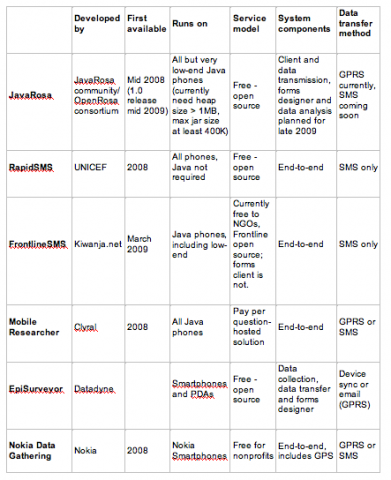
Comparison matrix

Case Studies And Other Resources
Yael Schwartzmann is a social entrepreneur, a programmer, and a mobile innovator. She developed a mobile data collection application-- DigitalICS -- to monitor smallholder coffee farmers' compliance with organic, fair trade certifications and quality requirements at a rural coffee cooperative in Oaxaca, Mexico.
Ethiopia again this year has experienced crippling droughts. Faced with the possibility of famine, UNICEF Ethiopia launched a massive food distribution program to supply the high-protein food Plumpy'nut to under-nourished children using mobile phones for monitoring and delivering supplies its more than 1,8000 feeding centers in the country. To coordinate the distribution and maintain appropriate stocks, field monitors reported on supplies and number of children fed through an SMS reporting system using a UNICEF-built mobile data collection and monitoring software, RapidSMS.
- From a case study in the report Wireless Technology for Social Change: Trends in NGO Mobile Use:
In 2002, Selanikio teamed up with computer scientist Rose Donna to form the DataDyne Group, a non-profit dedicated to increasing access to public health data through mobile software solutions. Inspired by an earlier CDC product called Epi Info, Selanikio created EpiSurveyor, a free, open-source, mobile data collection software tool. EpiSurveyor offers health data collection forms that can be downloaded at no cost and modified by anyone with basic computer skills. Selanikio and Donna believed that this technological innovation could empower developing country health officials with the tools needed to gather time-sensitive health data quickly, and without outside assistance.
- OpenMRS: From a case study in the report Wireless Technology for Social Change: Trends in NGO Mobile Use:
The Open Medical Records System (OpenMRS) is a free and open source electronic medical record application for developing countries (www.openmrs.org). The application has been used to manage patient and treatment information associated with HIV/AIDS and tuberculosis care in several countries in sub-Saharan Africa.
- Disease Surveillance in Uganada, using the African Access Point by AED Satellife. Interview with Berhane Gebru, Program Director at AED-SATELLIFE, an international organization which aims to strengthen health care in resource-poor countries by providing disease surveillance solutions and health information distribution to rural healthcare workers using mobile technology. He describes SATELLIFE's current project in Uganda which equips rural health workers with PDA's and GPRS wireless access points in order to transmit their health data collection to the ministry of health.
- Using Mobiles for Fight HIV Aids, an article about Cell-Life's work.
Cell-Life, a non-governmental organization based in Cape Town, South Africa, created its “Aftercare” program to work with the public health system and its health workers to provide home-based care for HIV/AIDS patients receiving ART treatments. The mobile technology-based Aftercare program supports the effective treatment of HIV/AIDS patients, and covers other aspects such as voluntary counseling. Each Aftercare worker is assigned to monitor 15 to 20 patients. The worker visits the patient in his or her home, and in a one- on-one session discusses the patient’s current treatment. Using their mobile phones for data capture, Aftercare workers record information about patient medical status, drug adherence, and other factors that may affect a patient’s ART therapy.
| Attachment | Size |
|---|---|
| Table1_datacollection.png | 83.9 KB |
| Graphic1_datacollection.png | 69.02 KB |
| Graphic2_datacollection.png | 83.69 KB |
| Table2_datacollection.png | 59.69 KB |
| Picture 3.png | 56.78 KB |
Mobile Phones for Data Collection data sheet 28083 Views
Abstract:
Mobile data collection and reporting projects are abundant now that mobile use for development is taking off. Unlike bulk messaging and general information services that are targeting the general public as recipients of standardized messaging, mobile data collection tools are often used internally in an organization, customized to fit with existing organizational processes.
This may mean using services or applications that are not part of most people's day-to-day experience of mobile use. Add a liberal sprinkling of jargon (and the mobile world's plague of acronyms) and you have a recipe for much technical confusion!
This article looks at choosing a mobile data collection solution, from defining the information requirements to choosing the most appropriate technology strategy for a specific organizational context and communication environment.
We also review a selection of commercial and non-commercial tools.
This may mean using services or applications that are not part of most people's day-to-day experience of mobile use. Add a liberal sprinkling of jargon (and the mobile world's plague of acronyms) and you have a recipe for much technical confusion!
This article looks at choosing a mobile data collection solution, from defining the information requirements to choosing the most appropriate technology strategy for a specific organizational context and communication environment.
We also review a selection of commercial and non-commercial tools.
FrontlineSMS Forms
Yael Schwartzmann is a social entrepreneur, a programmer, and a mobile innovator. She developed a mobile data collection application-- DigitalICS -- to monitor smallholder coffee farmers' compliance with organic, fair trade certifications and quality requirements at a rural coffee cooperative in Oaxaca, Mexico.
Ethiopia again this year has experienced crippling droughts. Faced with the possibility of famine, UNICEF Ethiopia launched a massive food distribution program to supply the high-protein food Plumpy'nut to under-nourished children using mobile phones for monitoring and delivering supplies its more than 1,8000 feeding centers in the country. To coordinate the distribution and maintain appropriate stocks, field monitors reported on supplies and number of children fed through an SMS reporting system using a UNICEF-built mobile data collection and monitoring software, RapidSMS.
In 2002, Selanikio teamed up with computer scientist Rose Donna to form the DataDyne Group, a non-profit dedicated to increasing access to public health data through mobile software solutions. Inspired by an earlier CDC product called Epi Info, Selanikio created EpiSurveyor, a free, open-source, mobile data collection software tool. EpiSurveyor offers health data collection forms that can be downloaded at no cost and modified by anyone with basic computer skills. Selanikio and Donna believed that this technological innovation could empower developing country health officials with the tools needed to gather time-sensitive health data quickly, and without outside assistance.
The Open Medical Records System (OpenMRS) is a free and open source electronic medical record application for developing countries (www.openmrs.org). The application has been used to manage patient and treatment information associated with HIV/AIDS and tuberculosis care in several countries in sub-Saharan Africa.
Cell-Life, a non-governmental organization based in Cape Town, South Africa, created its “Aftercare” program to work with the public health system and its health workers to provide home-based care for HIV/AIDS patients receiving ART treatments. The mobile technology-based Aftercare program supports the effective treatment of HIV/AIDS patients, and covers other aspects such as voluntary counseling. Each Aftercare worker is assigned to monitor 15 to 20 patients. The worker visits the patient in his or her home, and in a one- on-one session discusses the patient’s current treatment. Using their mobile phones for data capture, Aftercare workers record information about patient medical status, drug adherence, and other factors that may affect a patient’s ART therapy.